Why is it important to check a used Tesla before buying
Estimated reading time: 8 minutes
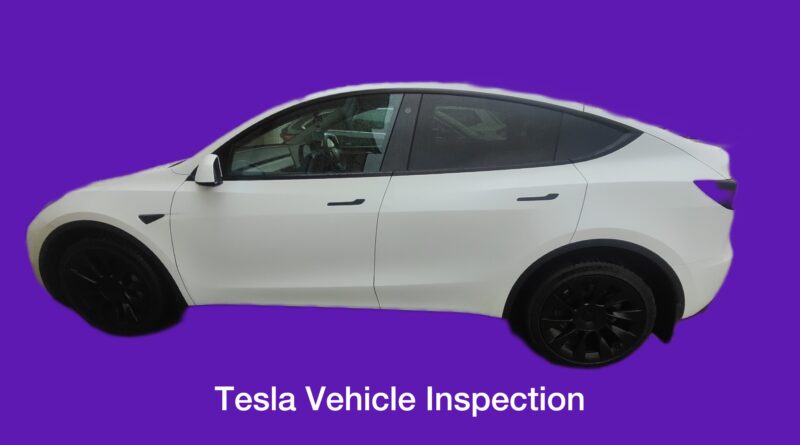
If you are considering purchasing a used Tesla vehicle, a thorough pre purchase inspection is crucial to ensure its condition and performance. Tesla, the renowned electric vehicle manufacturer, has gained immense popularity for its innovative approach to automotive technology. This guide provides a comprehensive overview of the key aspects to consider when conducting a Tesla pre purchase inspection.
1. Exterior Inspection:
Paint Quality: Assess the exterior paint for any scratches, dents, or inconsistencies. Tesla vehicles are known for their high-quality paint finishes. Body Panels: Check the alignment of body panels for uniform gaps, as misalignments could indicate previous repairs or accidents. Glass and Lights: Inspect the condition of the glass surfaces, including the windshield and windows. Ensure that all lights, including headlights, taillights, and turn signals, are functional.
2. Wheel and Tire Examination:
Tire Tread: Check the tread depth on all tires to ensure they meet safety standards. Uneven wear patterns may indicate alignment issues. Wheel Condition: Examine each wheel for damage or signs of curbing. Ensure that the wheels are properly aligned.
3. Undercarriage Inspection:
Suspension Components: Inspect the undercarriage for any signs of damage to suspension components. Look for leaks or excessive wear. Battery Tray: For Tesla electric vehicles, examine the battery tray for any signs of damage or corrosion.
4. Interior Examination:
Touchscreen and Controls: Test the functionality of the central touchscreen and other controls. Ensure that features such as climate control, audio, and navigation are working correctly. Seats and Upholstery: Check the condition of seats and upholstery for wear, stains, or damage. Interior Smells: Pay attention to any unusual odors inside the vehicle, as they could indicate issues with the HVAC system.
5. Battery and Charging System:
Battery Health: Assess the battery’s health and charging capacity. Tesla vehicles typically come with an extensive warranty for their battery systems. What to do before buying: Ask seller to run battery test it takes 24hr and its done as follows. At the and of the test it will display battery health in % and how many days ago it has been done. Check battery level go in Tesla menu navigate to software option, then click on tesla model displayed and hold your finger down on display for 3sec. window will pop up for service mode, it will asc for passcode type SERVICE. Menu will show up and select high voltage and another menu of HV health will show up and now click on health test. Now you will need to authorize this function; hold on fully up turn stalk + Brake + Key for 10 sec.
Before running this routine:
State of charge must be below 50%
Vehicie must be plugged into level 2 charger
Test may take up to 24 hours
HV battery will be discharged and then charged to full.
Heat will be generated outside the vehicle during discharge.
Checking Average consumption:
To calculate the available battery capacity you need three pieces of information which are easily accessible from the energy screen. If you are not showing % at the top of the screen, this can be changed via the Display options through the menus. The AVG consumption, the Projected range and the Percent. Charging Ports: Test the charging ports for proper functionality. Ensure that the vehicle can charge using different charging stations.
6. Driving Performance:
Test Drive: Take the Tesla vehicle for a test drive to evaluate its driving performance. Check for any unusual noises, vibrations, or handling issues. Autopilot Features: If applicable, test the Autopilot features to ensure they are functioning correctly.
7. Software and Updates:
Software Version: Check the current software version installed in the vehicle. Verify if there are any pending updates and ensure that the vehicle’s software is up to date.
8. Service History and Documentation:
Review Service Records: Request and review the vehicle’s service history and maintenance records. This provides insights into how well the car has been maintained.
9. Vehicle Identification Number (VIN) Check:
VIN History Report: Obtain a VIN history report to check for any accidents, title issues, or odometer discrepancies. This report provides a comprehensive overview of the vehicle’s background. Check car history
10. Exterior Inspection:
Paint Quality: Assess the exterior paint for any scratches, dents, or inconsistencies. Tesla vehicles are known for their high-quality paint finishes.
Body Panels: Check the alignment of body panels for uniform gaps, as misalignments could indicate previous repairs or accidents.
Glass and Lights: Inspect the condition of the glass surfaces, including the windshield and windows. Ensure that all lights, including headlights, taillights, and turn signals, are functional.
11. Wheel and Tire Examination:
Tire Tread: Check the tread depth on all tires to ensure they meet safety standards. Uneven wear patterns may indicate alignment issues. Wheel Condition: Examine each wheel for damage or signs of curbing. Ensure that the wheels are properly aligned.
12. Undercarriage Inspection:
Suspension Components: Inspect the undercarriage for any signs of damage to suspension components. Look for leaks or excessive wear. Battery Tray: For Tesla electric vehicles, examine the battery tray for any signs of damage or corrosion.
13. Interior Examination:
Touchscreen and Controls: Test the functionality of the central touchscreen and other controls. Ensure that features such as climate control, audio, and navigation are working correctly. Seats and Upholstery: Check the condition of seats and upholstery for wear, stains, or damage. Interior Smells: Pay attention to any unusual odors inside the vehicle, as they could indicate issues with the HVAC system.
14. Battery and Charging System:
Battery Health: Assess the battery’s health and charging capacity. Tesla vehicles typically come with an extensive warranty for their battery systems. What to do before buying: Ask seller to run battery test it takes 24hr and its done as follows. At the and of the test it will display battery health in % and how many days ago it has been done. Check battery level go in Tesla menu navigate to software option, then click on tesla model displayed and hold your finger down on display for 3sec. window will pop up for service mode, it will asc for passcode type SERVICE. Menu will show up and select high voltage and another menu of HV health will show up and now click on health test. Now you will need to authorize this function; hold on fully up turn stalk + Brake + Key for 10 sec.
Before running this routine:
State of charge must be below 50%
Vehicie must be plugged into level 2 charger
Test may take up to 24 hours
HV battery will be discharged and then charged to full.
Heat will be generated outside the vehicle during discharge.
15. Checking Average consumption:
To calculate the available battery capacity you need three pieces of information which are easily accessible from the energy screen. If you are not showing % at the top of the screen, this can be changed via the Display options through the menus. The AVG consumption, the Projected range and the Percent. Analyses between Tesla and BYD.
Charging Ports: Test the charging ports for proper functionality. Ensure that the vehicle can charge using different charging stations.
16. Driving Performance:
Test Drive: Take the Tesla vehicle for a test drive to evaluate its driving performance. Check for any unusual noises, vibrations, or handling issues.
Autopilot Features: If applicable, test the Autopilot features to ensure they are functioning correctly.
17. Software and Updates:
Software Version: Check the current software version installed in the vehicle. Verify if there are any pending updates and ensure that the vehicle’s software is up to date.
18. Service History and Documentation:
Review Service Records: Request and review the vehicle’s service history and maintenance records. This provides insights into how well the car has been maintained.
19. Vehicle Identification Number (VIN) Check:
VIN History Report: Obtain a VIN history report to check for any accidents, title issues, or odometer discrepancies. This report provides a comprehensive overview of the vehicle’s background. Check car history
Conclusion:
Conducting a thorough pre purchase inspection of a used Tesla vehicle is essential to make an informed purchasing decision. By carefully examining the exterior, interior, battery, driving performance, and documentation, you can ensure that the Tesla vehicle meets your expectations and standards. If needed, consider seeking the assistance of a qualified Tesla service professional for a more in-depth evaluation.
FAQs
What does a Tesla pre purchase inspection include?
A Tesla pre purchase inspection includes checks of the exterior condition, wheels and tyres, undercarriage, battery health, charging system, interior electronics, software status, and a full road test. It also involves reviewing service history and running a VIN check.
Is a pre purchase inspection necessary for a used Tesla?
Yes, a pre purchase inspection is essential. Although Tesla vehicles have fewer moving parts than traditional cars, battery condition, software systems, and hidden damage can significantly affect value and performance.
How do you check Tesla battery health before buying?
Battery health can be checked using Tesla service mode or by running a battery health test. This process measures capacity and performance and may take up to 24 hours. You can also estimate capacity using average consumption and projected range data from the energy screen.
How much does a Tesla pre purchase inspection cost in the UK?
The cost typically ranges from £200 to £500 depending on the inspection depth and whether advanced diagnostics or battery testing are included.
What are common problems in used Tesla vehicles?
Common issues include battery degradation, touchscreen faults, panel alignment inconsistencies, suspension wear, and software glitches. Some vehicles may also have charging port or sensor issues.
Can a Tesla pass inspection with hidden issues?
A professional inspection using diagnostics and physical checks can identify most hidden issues, including battery health concerns and structural damage. However, accuracy depends on the tools and expertise used.
How long does a Tesla inspection take?
A standard inspection takes between 2 to 3 hours. Battery health testing can take up to 24 hours if a full diagnostic cycle is performed.
Do I need a Tesla specialist for inspection?
Yes, it is recommended to use a Tesla specialist or EV-trained inspector. Tesla systems require specific knowledge and access to advanced diagnostics.
What should I check in a Tesla service history?
You should check for software updates, maintenance records, battery-related work, warranty status, and any previous repairs or recalls.
Can inspection results help negotiate the price?
Yes, findings such as battery degradation, cosmetic damage, or mechanical faults can be used to negotiate a lower purchase price or request repairs.
What happens if I skip a Tesla pre purchase inspection?
Skipping an inspection increases the risk of buying a vehicle with battery issues, hidden faults, or software problems, which can result in expensive repairs and reduced performance.